
cat OrcSDR/README.md
OrcSDR
Turn an M5Stack Tab5 and a compatible RTL-SDR receiver into a portable, touchscreen software-defined radio. The radio processing, dashboards, audio and controls all run on the Tab5. No laptop, Raspberry Pi or desktop SDR app after installation.
It started with one question: how far can the ESP32-P4 be pushed as a real SDR host? The first step was a clean-room USB driver (esp-rtl-sdr) so the microcontroller could own an RTL-SDR directly. Once the Tab5 could keep up with the IQ stream itself, that driver became the base for a whole radio.
It's an open-source hobby project, built with a lot of AI help, outside review and community testing. Features are labelled tested, experimental or unfinished based on the evidence I actually have.
- release
- v0.3.0-beta.1 (beta) · 2026-09-28
- image
- OrcSDR-Tab5-v0.3.0-beta.1.bin · 3,812,384 bytes
- sha256
- b10d726f0a3d05599836a04c4fa634f3e016b4474d29186f216cce7dcbdc65ed
- built with
- ESP-IDF 5.5.4 · esp_rtl_sdr v0.9.1
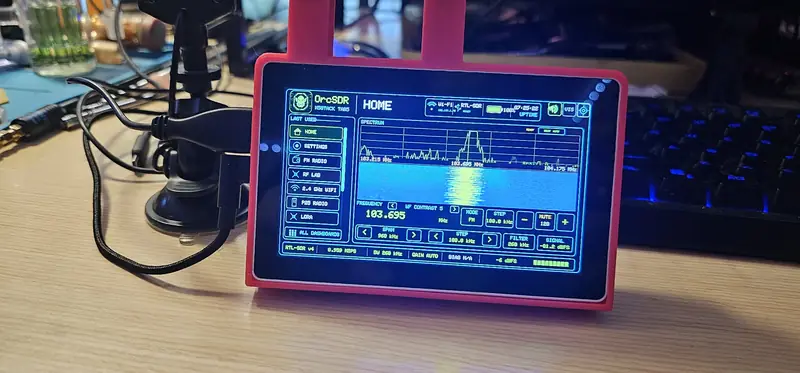
getting started
What you need
- M5Stack Tab5 (ESP32-P4). OrcSDR's test unit is hardware revision 1.3.
- An RTL-SDR receiver. The RTL-SDR Blog V4 is the tested baseline; others are experimental (table below).
- An antenna suited to the band you want. This matters more than almost anything else.
- A USB-C data cable for installing.
- Optional: a microSD card for maps, data packs, logs and IQ captures; headphones or a speaker on the 3.5 mm jack for better audio than the built-in speaker.
Install routes
- M5Burner: pick the OrcSDR Tab5 package and burn it. Resets saved settings (Wi-Fi, location, rotation).
- Windows settings-safe installer (release zip): writes only bootloader, partition table and app. Keeps settings. Linux/macOS builds exist but are untested on hardware.
- Browser installer (Chrome/Edge desktop). Untested on a Tab5 so far; resets settings.
First boot
Boot lands on Home. SD, Wi-Fi and USB start in stages with time-outs, so a missing card, network or dongle still gets you to the OrcSDR button. Plug the dongle in any time. Reception doesn't need Wi-Fi. After installing, unplug the PC USB cable: on the test bench it could contribute to brownouts under Wi-Fi plus radio load.
kit
I'm planning a parts kit: an M5Stack Tab5, an RTL-SDR Blog V4L and an antenna. It ships unflashed. You install the free, open-source OrcSDR firmware yourself, with M5Burner or the browser installer.
You don't need the kit. The parts are off-the-shelf and OrcSDR is free either way. Oregon Radio Company is not affiliated with M5Stack or RTL-SDR Blog.
receivers
| Receiver | Status | Notes |
|---|---|---|
| RTL-SDR Blog V4 | tested baseline | Full receiver path including the HF upconverter. Longest-tested. |
| RTL-SDR Blog V3 / V3c | experimental | V3c RF-verified on one unit (beta7, v0.3.0-beta.1). Earlier V3 provisional, 24 MHz and up. |
| RTL-SDR Blog V4L | experimental | Recognised from v0.3.0-beta.1 and checked on one unit; the feature-status doc still lists it as not verified. |
| Nooelec NESDR SMArt V5 | provisional | Identified and streamed in early tests; reception reports were mixed. |
| Other RTL2832U dongles | not verified | No evidence yet. |
Hardware reports with a serial log help: open an issue.
dashboards
| Dashboard | What it does | Evidence |
|---|---|---|
| FM Radio | Broadcast FM: stereo audio, RDS station info, presets, tuning tools. | RF-Verified / Regression-Tested |
| AM Radio | Broadcast AM with region-aware steps, presets and a 119-channel scan. | Hardware-Verified / Experimental |
| Weather | NOAA weather-radio channels. | Implemented, RF not verified |
| CB Radio | Band-wide scanner that stops on whoever is talking, priority channel, lockouts, AM/USB/LSB. | Implemented / Runtime-Verified |
| Shortwave | Generic Browse/NFM workspace. Full AM/SSB and calibrated HF are not implemented. | Implemented / Experimental |
| Airband | 118–136.975 MHz AM, 25/8.33 kHz steps, scanner controls, 121.500 guard. | Implemented / Experimental |
| Marine | VHF marine channels via generic NFM routing. | Implemented / Experimental |
| Satellite | Generic routing near 137.5 MHz. No dedicated decoder. | Implemented / Experimental |
| P25 Phase I | Trunked control channel, call following, clear voice. Encrypted audio is not decoded. | RF-Verified / Hardware-Verified / Regression-Tested |
| P25 Phase II | Grants, sync and burst decoding. Payload and audio are not implemented. | Implemented / Runtime-Verified / Regression-Tested / Experimental |
| ADS-B | 1090 MHz aircraft with position, altitude and optional FAA data. Live only. | RF-Verified / Hardware-Verified / Regression-Tested |
| LoRa / Meshtastic | Passive monitoring: packets, nodes, map, RF health. | Hardware-Verified / Experimental |
| POCSAG | Pager traffic at 1200 baud; 512/2400 host-tested only. No searchable archive. | RF-Verified at 1200 |
| RF Lab | Live measurements, IQ recording, full-screen visualizers. Not calibrated. | Implemented / Regression-Tested |
| 2.4 GHz Wi-Fi | Access point survey through the Tab5's C6 radio. Pauses reception while scanning. | Hardware-Verified / Experimental |
| Transmit | OrcSDR is receive-only. | Not Implemented |
Labels describe evidence, not marketing maturity. Source: feature status; the project's PROJECT_STATUS.md is authoritative.
screens
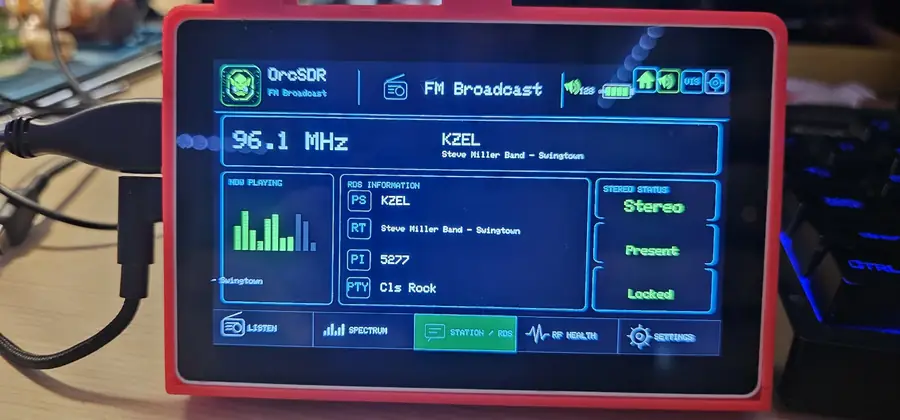
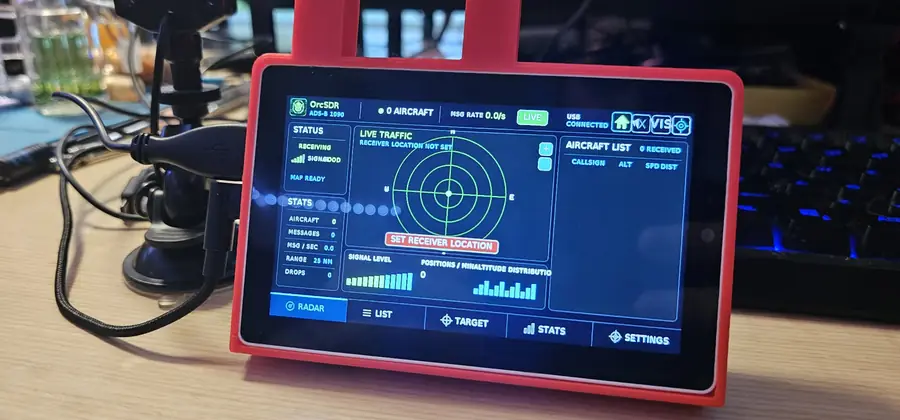
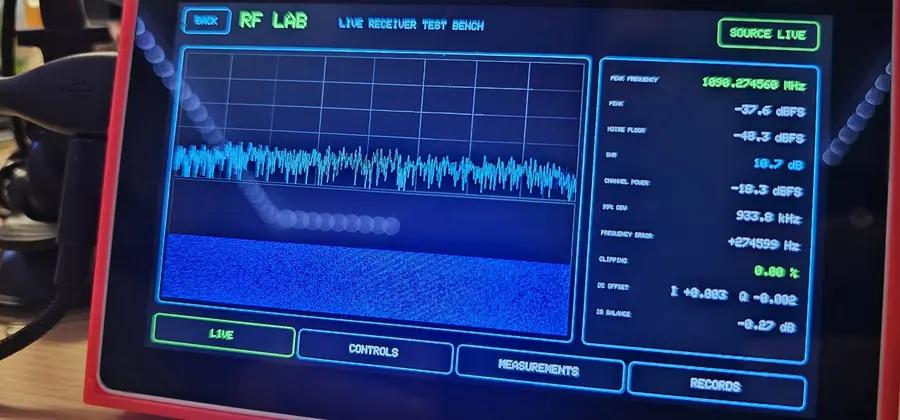
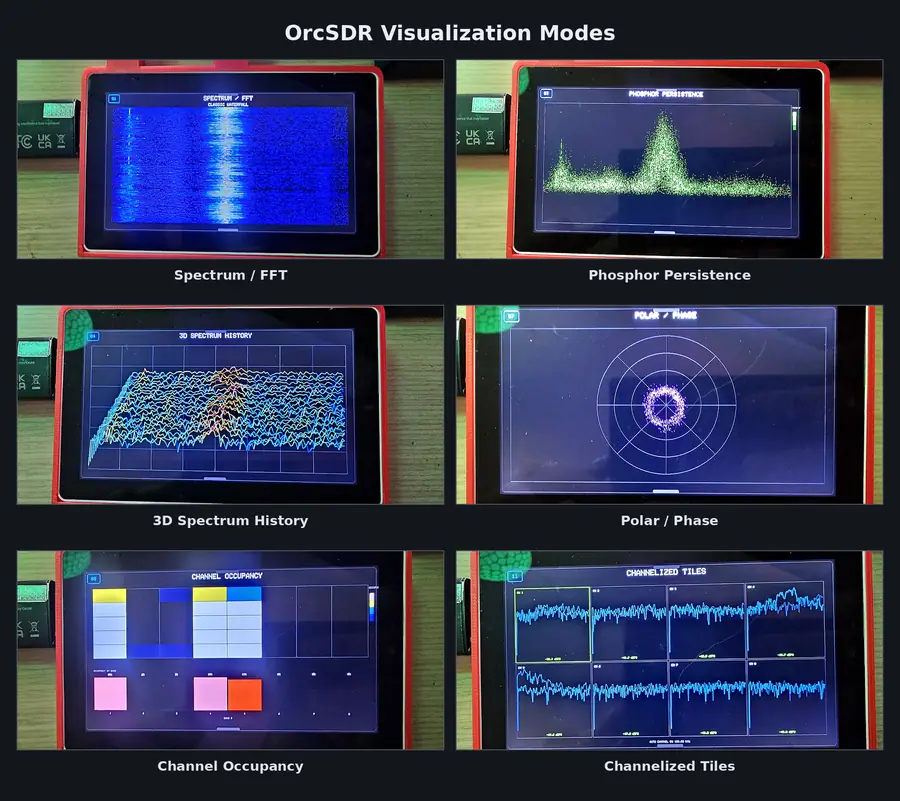
under the hood
Antenna → RTL-SDR tuner → High-Speed USB → esp-rtl-sdr → IQ buffers
                                                        ├─ DSP and decoders
                                                        ├─ touchscreen UI
                                                        ├─ speaker audio
└─ optional storage- ESP32-P4 on the Tab5 runs radio control, USB, DSP, graphics, touch and audio locally.
- 1280 × 720 touchscreen UI (M5Unified / M5GFX).
- High-Speed USB Host straight to the dongle; three 32 KiB transfers, with drop diagnostics.
- 48 kHz stereo audio through the Tab5 speaker.
- Wi-Fi from the onboard ESP32-C6 over SDIO (ESP-Hosted).
- Optional microSD for maps, data packs, logs and IQ captures.
- Native ESP-IDF 5.5.4 build with locked component versions.
faq
- Do I need a computer to use it?
- Only to install. After that the Tab5 does all the radio processing, display and audio by itself.
- Will installing erase my settings?
- M5Burner and the browser installer write a complete image from address 0, which resets Wi-Fi profiles, location and rotation. The Windows settings-safe installer keeps them.
- Can it transmit?
- No. OrcSDR is receive-only.
- Does it decode encrypted P25?
- No. The P25 dashboard follows encrypted calls but doesn't decode their audio. P25 Phase II audio isn't implemented.
- Why is the built-in speaker thin?
- It's a small monitoring speaker. The 3.5 mm output was hardware-tested and sounds as intended.
- My Tab5 resets during live radio.
- The docs trace many brownout resets to the PC flashing cable. Unplug it after installing and run from the Tab5's battery or a USB-C supply. Capture a serial log if it keeps happening.
- Signals are weak.
- Use an antenna suited to the frequency and keep the feed line short. Signal readings are relative dBFS, not calibrated dBm.
- What's the LAN web console?
- An opt-in browser control and audio page on your local network. It has no TLS or login, so only use it on a trusted network.
releases
v0.3.0-beta.1
V4, V4L and V3/V3c recognised with their own gain steps and bias-T rules (driver esp_rtl_sdr v0.9.1). Tuner bandwidth changes no longer shift frequency. New Home gain panel. CB tuned directly on V4/V4L, so no AM ghosts. FM stereo + RDS DSP load down from about 68% to 45%. Hot-plug a dongle any time. Browser audio in the LAN console. SD writes about 15× faster. First Windows settings-safe installer.
v0.2.0-beta7
Hardware-tested RTL-SDR Blog V3c. New Shortwave dashboard. V3c cold-start spectrum fix. The first .bin upload was app-only by mistake and was replaced on Sep 18 with the complete image.
v0.2.0-beta.6 multi-dongle RC4
Hardware-tested V3C support with tuner detected by probe; V4 stays the regression baseline.
v0.2.0-beta.6 multi-dongle RC3
Driver fix for reusing USB transfers after a drain timeout; AM scan reworked across all 119 channels.
v0.2.0-beta.6 multi-dongle RC1/RC2
First builds beyond the V4 using esp_rtl_sdr 0.8.0; V3 and Nooelec V5 provisional. Superseded.
v0.2.0-beta.5
Fixes a battery-power boot loop by moving Wi-Fi start-up out of early boot. Wider Meshtastic coverage beyond the US. Native POCSAG receiver.
v0.2.0-beta.4
Supersedes the withdrawn beta.3. ADS-B and P25 improvements, FM for Japan, main-task stack headroom restored.
v0.2.0-beta.2
Home screen layout rework, shared radio control between dashboards, automated scan and memory checks.
v0.2.0-beta.1
One M5Burner package with a pinned ESP-Hosted C6 3.0.6 image and in-app C6 update.
All releases and full notes on GitHub →
License: GNU AGPL-3.0-only, with separate commercial licensing in LICENSING.md. You're responsible for using a receiver legally where you live.
Sources: OrcSDR README.md, docs/user-guide (getting-started, feature-status, troubleshooting) and GitHub release notes, fetched 2026-10-01/02.